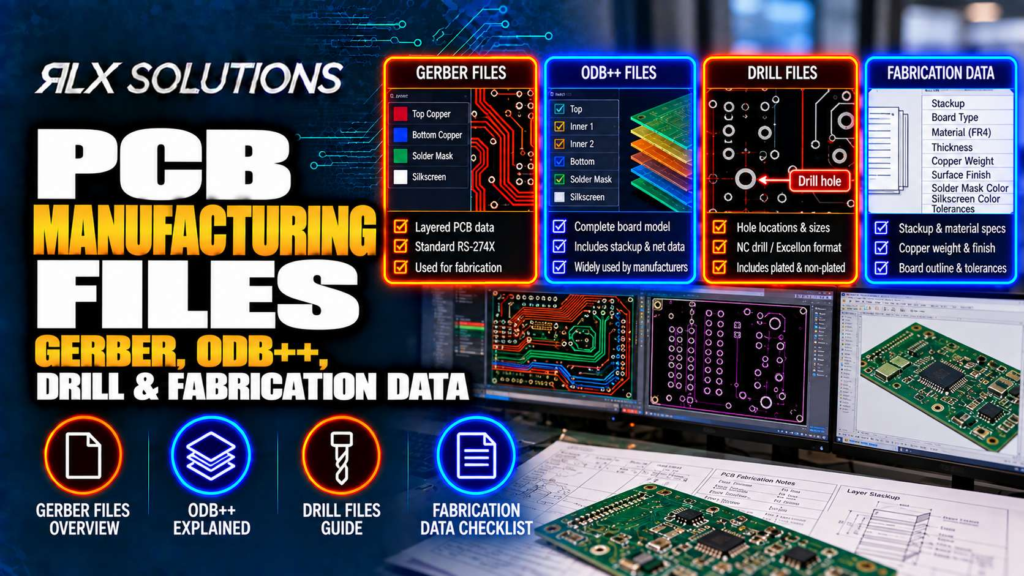
PCB manufacturing files tell a fabricator what copper to image, where to drill, how to build the stackup and which requirements govern the finished board. RLX Solutions, a contract electronics manufacturer in Concord, Ontario, accepts Gerber RS-274X, ODB++, IPC-2581 and NC drill data, but file format alone does not make a package production-ready.
A PCB fabrication package is a manufacturing definition, not a collection of plots
For a bare printed circuit board, the fabrication package has to communicate two kinds of information. Machine-readable data defines geometry such as copper, holes, solder mask and board profile. Human-readable fabrication data defines requirements that geometry cannot communicate reliably, including stackup intent, controlled impedance targets and fabrication notes.
That distinction matters because a perfectly rendered copper image can still describe the wrong board.
Consider a hypothetical 8-layer, 1.6 mm PCB with a 0.30 mm finished plated hole. The Gerber copper layers may be internally consistent, and the NC drill file may place every hole correctly. If the package does not make the intended layer order clear, however, the manufacturer still needs to resolve which copper image is Layer 2, Layer 3 and so on before releasing the build.
A production package therefore needs agreement between geometry and engineering intent. More files do not automatically create more certainty. The files must describe the same revision of the same board.
Gerber RS-274X separates PCB geometry into manufacturing layers
Gerber RS-274X represents PCB artwork as separate image files. A typical package contains individual data for top and bottom copper, each internal copper layer, solder mask, silkscreen and other plotted features.
The strength of Gerber is also the reason file discipline matters. Because the manufacturing definition is distributed across multiple files, the fabricator has to associate each file with its correct physical function.
For a 6-layer board, for example, the package might contain:
- Layer 1, top copper
- Layer 2, inner copper
- Layer 3, inner copper
- Layer 4, inner copper
- Layer 5, inner copper
- Layer 6, bottom copper
- Top and bottom solder mask
- Top and bottom silkscreen
- Board profile
- NC drill data
- Supporting fabrication documentation
The engineering risk is not that Gerber cannot represent the copper. It is that relationships between separate files can become ambiguous when naming, revision control or supporting documentation is weak.
File names should make layer identity obvious
A filename such as inner2.gbr has meaning only if everyone agrees what “inner2” means. A layer map that explicitly associates that file with Layer 3 removes interpretation.
This becomes more important as layer count rises. Swapping two plane layers on a simple board may be caught during review. Swapping signal and reference layers in a controlled-impedance stackup can alter the electrical structure even though every individual Gerber file renders normally.
The manufacturer needs to know not just what each image looks like, but where it belongs in the physical stack.
ODB++ packages geometry and manufacturing relationships together
ODB++ takes a different approach. Instead of relying primarily on a set of independent artwork files, it carries PCB manufacturing information in a structured dataset.
That structure can reduce manual interpretation because relationships between manufacturing objects travel with the job. Pads, nets, drill information and layer relationships can be represented with more context than a conventional set of separate Gerber plots.
That does not make ODB++ immune to bad source data. If the CAD database contains an incorrect drill definition or the wrong revision is exported, packaging the information more completely preserves the mistake more completely.
Gerber vs ODB++ is partly a handoff decision
| Decision factor | Gerber RS-274X | ODB++ |
|---|---|---|
| Basic model | Separate manufacturing images | Structured manufacturing dataset |
| Layer interpretation | Relies more heavily on file organisation | Layer relationships travel within the dataset |
| Supporting fabrication documentation | Still required for requirements outside geometry | Still required for requirements outside geometry |
| Human inspection | Individual plots are straightforward to view | Dataset requires an ODB++-aware viewer |
| Main handoff risk | Missing, duplicated or misidentified files | Incorrect source or export information carried into the dataset |
Neither format eliminates engineering review. The more useful question is whether the delivered package gives the fabricator one unambiguous definition of the board.
Board A vs Board B shows why file format is not the main cost driver
Take two hypothetical 10-layer boards, both 1.6 mm thick.
| Factor | Board A | Board B |
|---|---|---|
| Layer count | 10 | 10 |
| Overall thickness | 1.6 mm | 1.6 mm |
| Via structure | Through vias only | Layer 1 to Layer 2 and Layer 2 to Layer 3 microvias plus buried vias |
| Small laser-drilled hole | None | 0.10 mm |
| Lamination structure | Conventional multilayer build | Sequential build required by blind and microvia structure |
| Manufacturing consequence | Fewer interdependent fabrication stages | Additional drilling, plating, filling and lamination relationships |
Export Board A as ODB++ and Board B as Gerber, and Board B does not suddenly become the simpler board. Its via architecture changes the physical manufacturing sequence.
This is an important procurement distinction. File format affects how efficiently manufacturing intent is transferred. Board architecture determines much of what the factory must actually do.
NC drill data has to agree with the copper that surrounds every hole
NC drill data tells drilling equipment where holes belong and which tool sizes apply. For PCB manufacturing, however, coordinates and diameters are only part of the definition.
A fabricator also needs to distinguish plated from non-plated features correctly. Plated through-holes participate in the electrical structure of the board. Tooling or mounting holes may be non-plated. Slots add another geometry that needs the correct manufacturing treatment.
A mismatch between drill data and copper can produce a board that looks correct in separate viewers but fails when the datasets are overlaid.
Finished hole size and manufacturing drill size are different concepts
A plated hole receives copper during fabrication. The finished opening is therefore not simply the mechanical drilling operation viewed in isolation.
Suppose a hypothetical 4-layer board specifies a 0.30 mm finished plated hole surrounded by a 0.50 mm pad. The designer should communicate the intended finished feature rather than trying to reverse-engineer the fabricator’s internal tool compensation.
The manufacturer controls process compensation. The engineer controls the required finished geometry.
This division prevents fabrication assumptions from leaking into CAD data.
Aspect ratio connects drill geometry to board thickness
Hole diameter cannot be evaluated without board thickness. A 0.20 mm hole through a 0.8 mm board and the same diameter through a 2.0 mm board impose very different plating conditions.
For the second example:
Aspect ratio = 2.0 mm / 0.20 mm = 10:1
That number matters because copper has to plate through the depth of the hole. As the hole becomes deeper relative to its diameter, maintaining the required deposit through the barrel becomes harder.
A drill file therefore cannot be reviewed intelligently without the stackup and finished board thickness.
Blind, buried and microvias need more than an ordinary drill export
A through-hole passes through the entire printed circuit board. Blind and buried vias do not, so the fabrication package has to communicate which layers each via connects.
A Layer 1 to Layer 3 blind via is a different manufacturing instruction from a Layer 3 to Layer 6 buried via. The layer endpoints determine when drilling and plating occur relative to lamination.
This is where a flat list of hole coordinates becomes inadequate as a complete engineering description.
Microvias change the build sequence
Laser-drilled microvias are formed within a specific layer structure. Stacked or staggered microvias add further dependencies because the fabricator must control drilling, plating, filling and subsequent lamination in the correct order.
Via-in-pad adds another adjacent process. When a component pad contains a via, leaving the feature open can interfere with solder deposition or allow solder to move into the via during assembly. Resin filling, copper capping and planarisation create a surface suitable for component attachment where that construction is specified.
Consider a hypothetical 6-layer HDI board with a 0.10 mm Layer 1 to Layer 2 microvia directly inside a 0.4 mm-pitch BGA pad. The drill definition alone does not fully communicate the required manufacturing result. The fabrication data also has to make the layer span and via treatment clear.
This is a recurring file-preparation principle: once a feature depends on process sequence rather than simple X-Y geometry, the package needs enough information to communicate that sequence.
The fabrication drawing carries requirements the artwork cannot
Gerber and ODB++ can describe extensive board geometry, but a fabricator still needs engineering requirements that are not safely inferred from artwork.
A useful fabrication drawing or fabrication note set can identify:
- Finished board thickness and relevant tolerances
- Layer order and stackup requirements
- Material requirements
- Copper requirements
- Surface finish
- Controlled-impedance targets
- Plated and non-plated hole requirements
- Special via construction
- Board profile and mechanical requirements
- Applicable workmanship or performance requirements
- Any features requiring special fabrication treatment
Each item closes a different ambiguity.
For example, a copper trace width does not by itself define a controlled-impedance requirement. Impedance depends on the relationship between conductor geometry, dielectric properties, dielectric thickness and reference structure. The impedance target therefore has to travel with the fabrication package.
Controlled impedance makes stackup data part of the electrical design
Suppose a hypothetical 8-layer design routes a controlled trace on Layer 3 referenced to a plane on Layer 2. The electrical result depends on the dielectric relationship between those layers.
If the fabricator changes that dielectric thickness while preserving the Gerber trace width, the artwork remains visually identical while the transmission-line geometry changes.
This is why impedance should not be treated as a note added after routing. Stackup, trace geometry and impedance target are linked design variables.
Where controlled impedance is specified, coupon testing by time-domain reflectometry (TDR) can verify the manufactured result. The manufacturing package needs to state the target clearly enough for the stackup and verification method to be established before production.
IPC-2581 provides another structured manufacturing-data path
IPC-2581 is another accepted manufacturing-data format that can carry PCB information in a structured exchange rather than relying exclusively on independent artwork files.
From an engineer’s perspective, the useful distinction is not “modern format versus old format.” It is how much manufacturing context survives the handoff from the design database.
Structured formats can reduce opportunities for mismatched files, but they cannot decide engineering intent. Material requirements, special processes, controlled impedance and other requirements still need to be represented correctly in the released package.
The safest release is therefore the format your design flow can generate correctly, combined with supporting fabrication information that closes any remaining interpretation.
Run a release check on the complete package, not each file in isolation
A manufacturing release should be treated as one controlled dataset. Reviewing individual files without comparing them can miss contradictions between copper, drill, outline and documentation.
Before release, verify:
- Revision consistency. Every exported file and drawing belongs to the same design revision. Mixing one older drill file into a new Gerber set can create a package that looks complete but is physically wrong.
- Layer completeness. Every intended copper, solder mask and other required manufacturing layer is present and uniquely identified.
- Drill alignment. Overlay drill data with copper and confirm plated and non-plated definitions.
- Board profile. Confirm the profile is unique, correctly scaled and aligned with the PCB data.
- Stackup agreement. Layer names in the exported data agree with the documented physical stack.
- Special-via definition. Blind, buried, microvia and via-in-pad structures have clear layer spans and treatment.
- Impedance information. Targets and the relevant stackup information are included where controlled impedance is required.
- Fabrication notes. Finish, material and other manufacturing requirements agree with the CAD release.
- Duplicate-data removal. Obsolete exports are not sitting beside current files with nearly identical names.
- Assembly-package separation. BOM, pick-and-place or centroid data and assembly drawings are included when assembly is required, without confusing assembly information with the bare-board definition.
The last check becomes particularly important when one release package supports both PCB fabrication and printed circuit board assembly. Fabrication files define the bare board. The bill of materials (BOM), placement data and assembly drawing tell the assembler what gets installed on it.
Manufacturing review should happen before the files become purchase-order instructions
The most expensive file problem is often one that is technically manufacturable but does not express the designer’s actual intent.
A missing outline is obvious. A plausible but incorrect stackup can be more dangerous because it may survive automated checks. The same applies to an outdated drill file that still aligns with most pads or a controlled-impedance requirement omitted from the fabrication notes.
This is why design for manufacturability (DFM) review is more than checking whether minimum geometries pass. The reviewer has to examine relationships: hole to pad, copper to edge, via architecture to lamination sequence, trace geometry to stackup and fabrication data to assembly requirements.
The engineering goal is a package from which the board can be built without guessing.
Send one controlled package for engineer-reviewed DFM
If your board is moving from layout into prototype or production, RLX reviews the manufacturing package as part of every quote. Send the applicable Gerber RS-274X, ODB++, IPC-2581 or NC drill data together with the stackup, impedance targets and fabrication notes, plus BOM, pick-and-place data and assembly drawings when assembly is included.
FAQ
What files do I need to send for PCB manufacturing?
For bare PCB fabrication, send the manufacturing dataset plus the documentation needed to define the finished board. That can include Gerber RS-274X, ODB++, IPC-2581 and NC drill data, supported by a stackup PDF, impedance targets and fabrication notes. If assembly is also required, include the BOM, pick-and-place or centroid file and assembly drawing.
Can I send ODB++ instead of Gerber files?
Yes. ODB++ can carry PCB manufacturing information as a structured dataset rather than a collection of separate artwork files. The important requirement is that the export correctly represents the released design. Supporting fabrication information is still needed wherever geometry alone does not fully define material, stackup, impedance or special-process requirements.
Do I need a separate NC drill file with Gerbers?
A Gerber-based fabrication release normally needs the hole information required to manufacture the board, and NC drill is an accepted manufacturing format. The drill data must correspond to the same revision as the copper artwork and clearly support the intended plated, non-plated and special hole structures. Review the drill and copper as an overlaid dataset before release.
Should PCB assembly files be included with the fabrication package?
Include them when the same supplier is handling assembly, but understand their different functions. The fabrication data defines the bare circuit board. Assembly requires additional information, including a BOM, pick-and-place or centroid data and an assembly drawing. Keeping those roles clear helps prevent fabrication requirements from being confused with component-placement instructions.
How should I document controlled impedance?
Provide the impedance target and relevant stackup information with the manufacturing package. Controlled impedance is a relationship between conductor geometry and the surrounding dielectric and reference structure, so the Gerber trace image alone is insufficient. The fabricator can then evaluate the stackup and establish the manufacturing geometry and verification approach before the board is released.
What is the biggest risk when exporting PCB manufacturing files?
A major risk is inconsistency between files that appear valid individually. Copper from one revision, drill data from another, an outdated outline or a stackup that disagrees with the layer mapping can create an apparently complete package with conflicting instructions. Review the final archive as one manufacturing definition rather than validating each export independently.